WeChat Guide: Chat & Pay Like a Local
WeChat isn't just the Chinese WhatsApp—it's a lifestyle. Learn how to set up WeChat Pay, scan QR codes, and use mini-programs to order food.

More Than Just a Chat App 💬
Hey guys! If Alipay is your travel wallet, WeChat (Weixin / 微信) is your social lifeline.
In the rest of the world, we use WhatsApp to text, Instagram to share photos, and Apple Pay to buy things. In China, WeChat does absolutely everything. It is how you communicate, how you pay at restaurants, how you scan menus to order food, and how you share moments with new friends.
You need both Alipay and WeChat to survive in China. Let's get your WeChat set up properly so you can chat and pay like a true local!
📥 Step 1: Download & Registration (Do This BEFORE You Fly!)
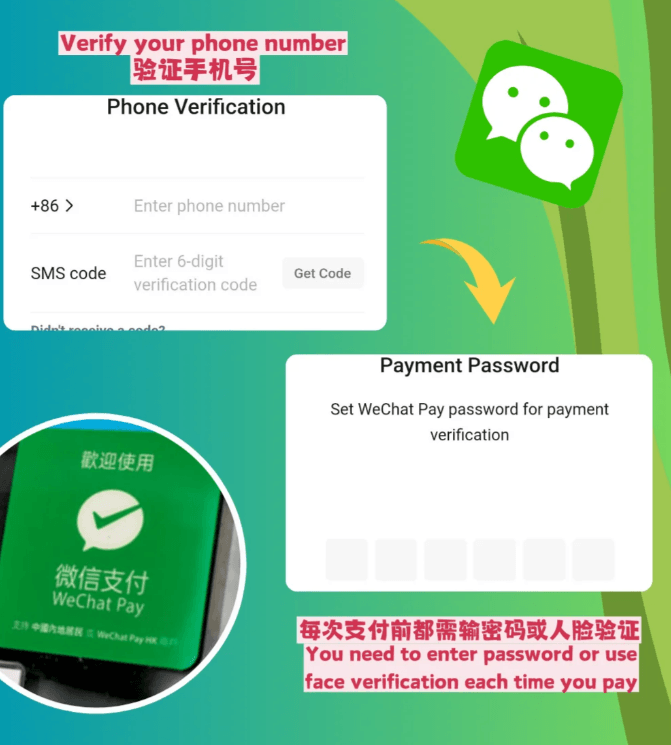
🚨 Critical Warning: Registering WeChat is MUCH harder than Alipay! Unlike Alipay, WeChat has incredibly strict anti-spam measures for new foreign accounts. You MUST do this in your home country before you leave.
Here is what you need to know about the infamous "Security Verification":
- Download: Search for "WeChat" in your App Store or Google Play Store.
- Register: Use your home country phone number to sign up. We strongly recommend using your mobile data (cellular network) instead of Wi-Fi during registration to avoid being flagged by their risk control system.
- The Security Verification (The Hard Part): WeChat will require you to verify your identity to complete registration. There are generally two ways this happens:
- Method A (Credit Card Verification): If you are lucky, WeChat might offer an option to verify your identity by binding a major international credit card (like Visa or Mastercard). Crucial: The name on your credit card must exactly match the name on your passport. This is the easiest method if available!
- Method B (Friend QR Code Scan): If the credit card option isn't offered or fails, WeChat will ask you to have an existing WeChat user scan a QR code to verify your new account.
- The strict rules for the person scanning your code: They must have an active WeChat account, it must be fully real-name verified, AND they cannot have helped anyone else verify an account in the past 6 months.
- Timezone issues: Ideally, find someone in the same timezone as you. If your friend is in China and you are in the US, the QR code often expires or bugs out due to the timezone difference. If it expires, you just have to keep trying.
- Tip: If you don't know anyone with WeChat, ask a Chinese colleague, or try contacting your hotel in China via email to see if their staff can help.
💳 Step 2: Setting Up WeChat Pay
Just like Alipay, WeChat Pay allows you to bind a foreign credit card!
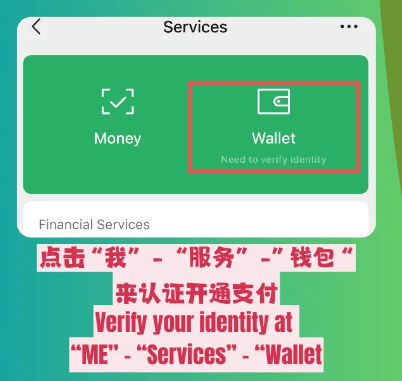
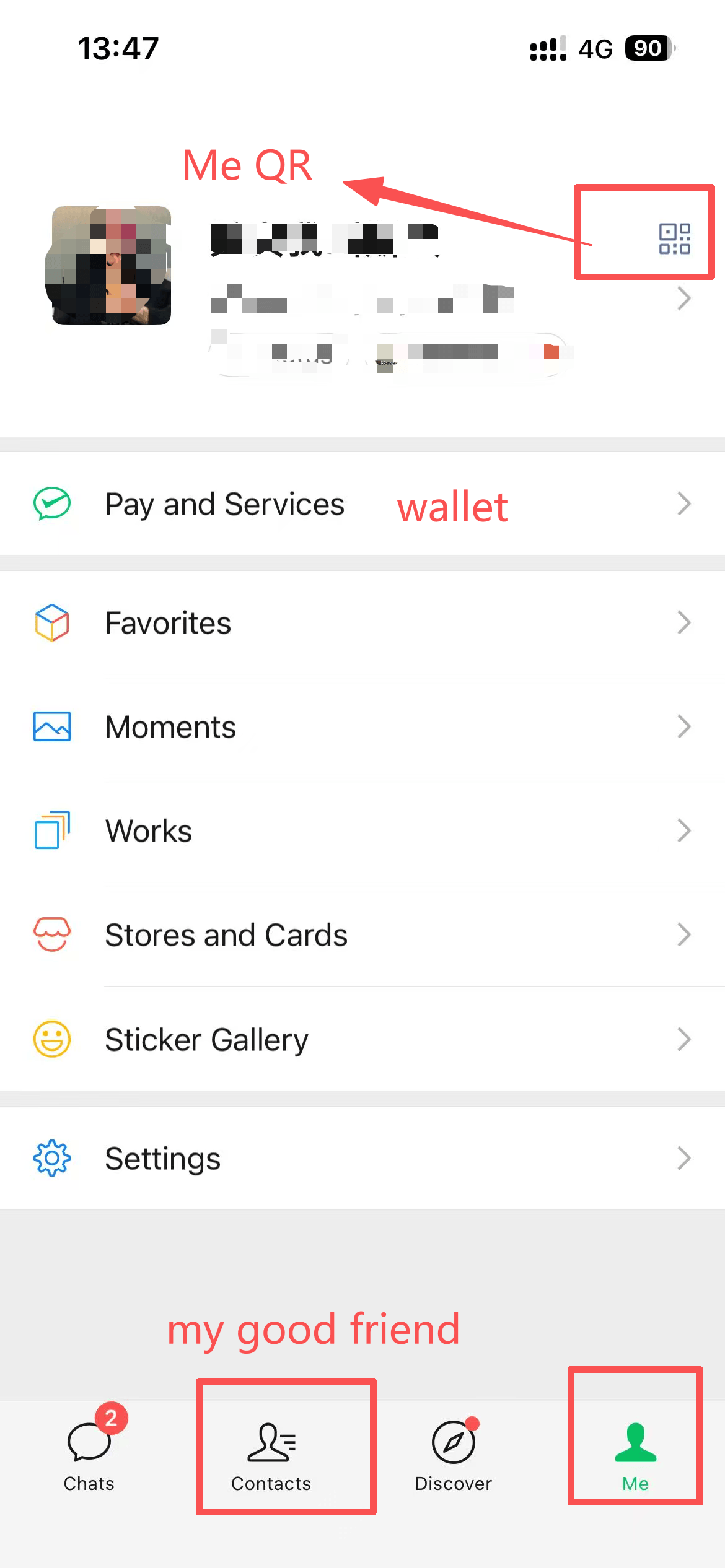
- Open WeChat and tap "Me" in the bottom right corner.
- Tap "Services" (or "Pay"). If you don't see this option, try asking a friend to send you a 1 RMB red envelope—it magically unlocks the Pay feature!
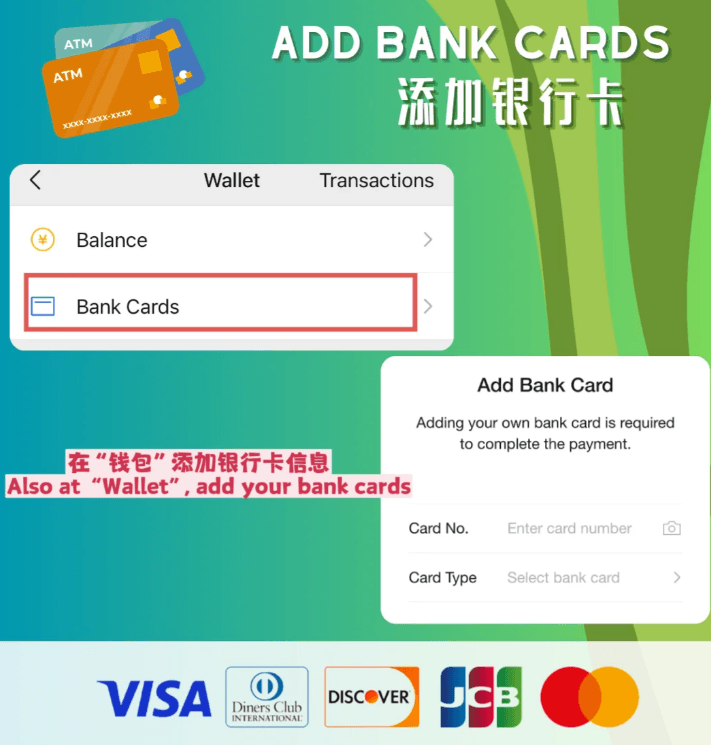
- Tap "Wallet" → "Bank Cards" → "Add a Card".
- Add your Visa, Mastercard, JCB, or Discover card.
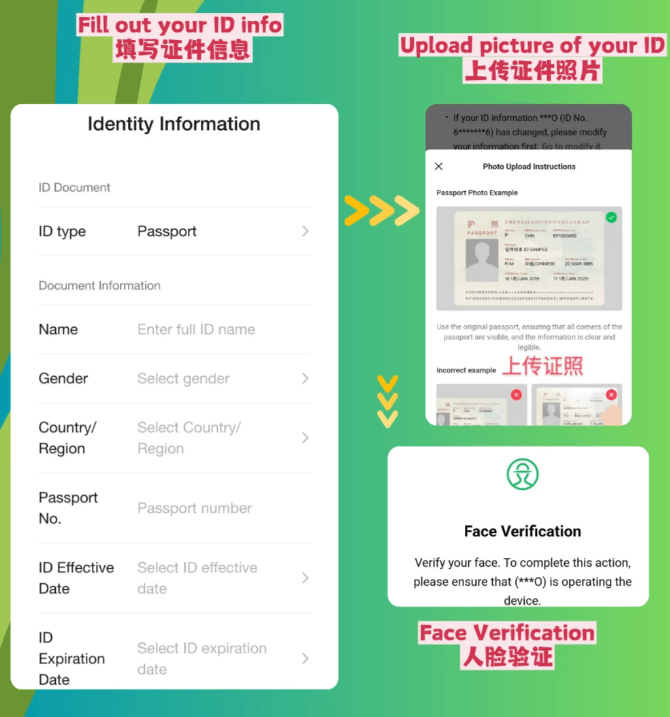
- Identity Verification: You will be prompted to upload your passport and complete real-name authentication. This is strictly required by Chinese financial law. You MUST upload your real passport information to use WeChat Pay. Follow the steps carefully!
🍜 Step 3: How to Pay & Order Food
WeChat Pay works almost identically to Alipay, but it has a massive advantage in restaurants: Mini-Programs.
1. Paying at the Register:
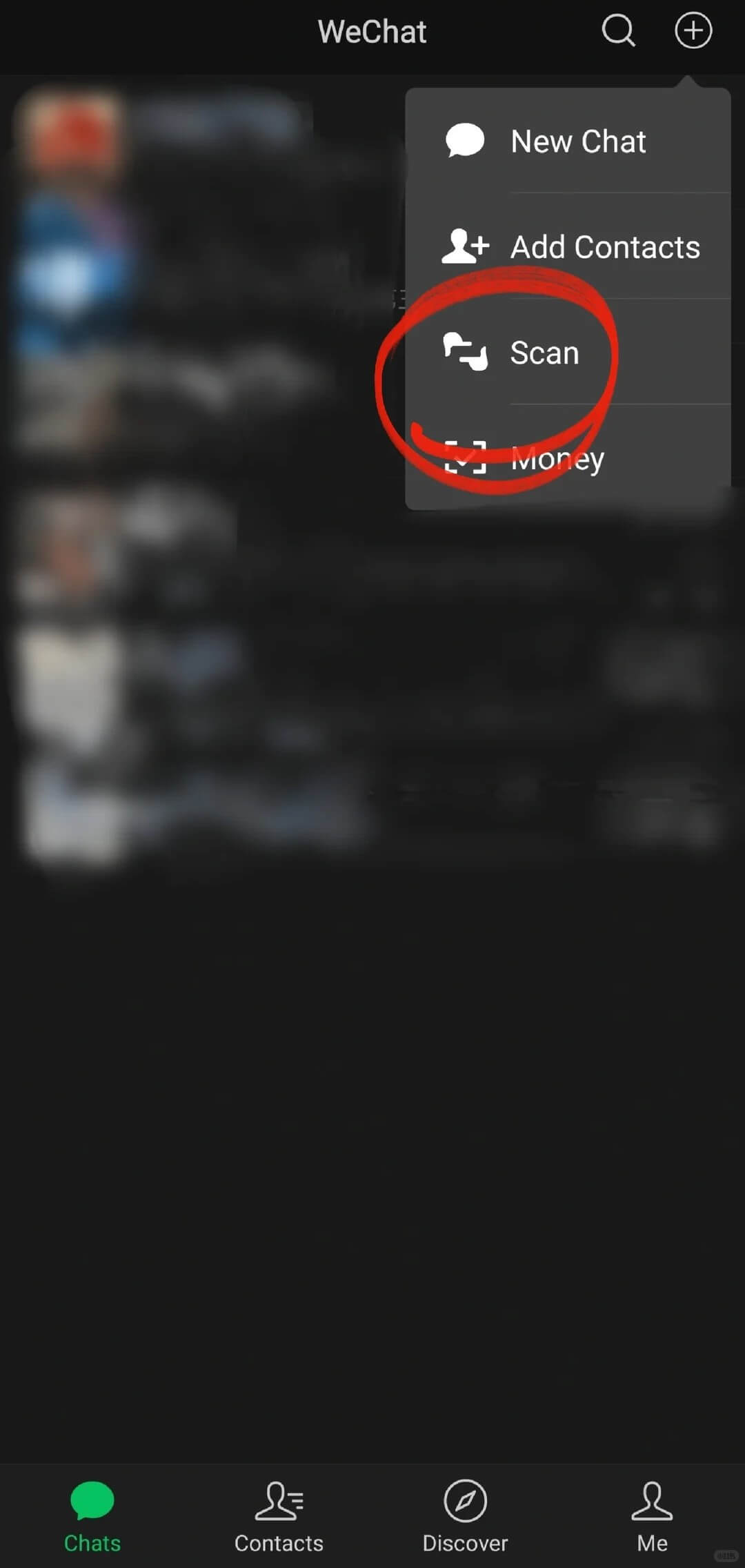
- They Scan You: Tap the "+" icon in the top right corner of the main chat screen, then select "Money". Show the barcode to the cashier.
- You Scan Them: Tap the "+" icon, select "Scan", point your camera at their green WeChat Pay QR code, type the amount, and hit pay.
2. The Restaurant Magic (Scanning the Table): When you sit down at a restaurant in China, you usually won't get a paper menu. Instead, there is a QR code glued to the corner of your table.
- Open WeChat → Tap "+" → Tap "Scan".
- Scan the table code. It will instantly open the restaurant's "Mini-Program" (a mini-app inside WeChat).
- You can browse the menu (use your translation app if needed), add items to your cart, and pay directly through WeChat Pay without ever calling a waiter!
- ⚠️ The Foreigner Fallback: Some restaurant mini-programs might prompt you to "bind a Chinese phone number" before you can order. If you don't have one, or if the app is too confusing, don't panic! Just wave to a waiter and say "Hello!" or point to our translation tool. They are very used to helping foreigners and will happily bring you a physical menu or take your order manually.
🤝 Step 4: Adding Friends & Staying Connected
This is the most beautiful part of WeChat. In China, nobody asks for your phone number or your Instagram—they ask to scan your WeChat.
Whether it's a friendly tour guide, a helpful local who showed you the way, or a new friend you met at a cafe, staying in touch is incredibly easy:
- To add someone: Tap the "+" icon → "Scan" and point it at their QR code.
- To show your code: Tap "Me" → tap your profile picture/name at the top → tap "My QR Code".
The best part? WeChat is a global app. Long after your trip is over and you are back in your home country, you can still use WeChat to chat, send photos, and stay connected with your new Chinese friends over Wi-Fi. It breaks down all borders!
FAQ
Q: Can I transfer money to friends using my international credit card?
A: No. Just like Alipay, international credit cards bound to WeChat Pay can ONLY be used for merchant payments (scanning a store's QR code or paying inside a mini-program). You cannot use them to transfer money to friends, send red envelopes (Hongbao), or top-up your WeChat balance. You do not need to top-up to pay at stores!
Q: Why do my payments sometimes fail at street carts?
A: Very small street carts sometimes use personal QR codes rather than official merchant QR codes. Foreign credit cards are generally blocked from paying personal accounts. Always keep some physical cash (RMB) in your pocket as a backup for these situations!
Q: What is the transaction fee for WeChat Pay?
A: It follows the exact same "200 RMB Rule" as Alipay! Transactions under 200 RMB (approx. $28 USD) have 0% fees. Anything over 200 RMB incurs a 3% fee. And yes, if you have a UnionPay (银联) card, there are no fees at all.
Q: Can I use WeChat to pay for Alipay codes?
A: No! This is a very common mistake. WeChat (green) and Alipay (blue) are fierce competitors. You cannot use WeChat to scan an Alipay QR code, and you cannot use Alipay to scan a WeChat QR code. Always look at the color of the sign on the vendor's desk!
Q: What is the difference between the Domestic and International versions of WeChat?
A: As a foreigner registering with a non-Chinese phone number and passport, you are using the "International Version" of WeChat Pay. You can bind foreign credit cards to scan and pay merchants. However, you cannot use social financial features like transferring money to friends, sending Red Envelopes (Hongbao), or receiving money. To unlock the full "Domestic Version" with all financial features, you must have a mainland Chinese phone number (+86) AND a mainland Chinese bank account.
Q: I don't have any friends with WeChat to help me scan and verify my registration. What do I do?
A: This is a very common roadblock! If you really can't find anyone, a popular workaround is to download Xiaohongshu (REDnote)—China's Instagram. You can register for Xiaohongshu without needing a friend's verification. Once inside, create a post asking for help (like "Can someone help verify my WeChat?"). Many friendly locals or other expats will offer to help. Warning: Because of the strict timezone and 6-month rules mentioned earlier, it often fails even when someone tries to help. You might have to try with several different people before it finally works. Be patient!
Q: Why do I need WeChat if I already have Alipay?
A: Alipay is slightly more foreigner-friendly for things like DiDi (Uber) and transit codes. However, WeChat is absolutely essential for communication. If you hire a private driver, meet a local tour guide, or want to make friends, the first thing they will ask is: "Can I add your WeChat?" Plus, some smaller vendors might only accept WeChat Pay. You need both!
© Copyright Notice
This article is originally published by China Fixer. All rights reserved. Unauthorized reproduction, scraping, or commercial use of this content is strictly prohibited.
If you wish to share this guide, please use the original link: https://cnfixer.xyz/fr/guides/wechat-pay-chat-guide
Avez-vous des questions ?
Si vous ne comprenez pas quelque chose, veuillez poser la question dans la section des commentaires ci-dessous, et je répondrai immédiatement !
Authentic guide by a local who has lived & traveled extensively across China.
Last updated: 2026