Maps & Navigation Guide: Getting Around China
Why Google Maps will get you lost in China, how Apple Maps magically works, and why Amap (Gaode) is the ultimate local tool.

The "Map Ghosting" Problem 🗺️
Most travelers land in China, excitedly open Google Maps, and immediately realize two things:
- The Wall: It won't load without a VPN. (Make sure you check out our eSIM & VPN Setup Guide before you fly).
- The Offset (The real killer): Even with a VPN turned on, the "Blue Dot" of your GPS location is often 500 meters away from where the map says you are. You'll be standing in the middle of a street, but Google Maps will show you floating in a river. This is due to strict local mapping regulations and coordinate system differences.
If you rely on Google Maps here, you will be walking into walls or missing turns all day.
Here is exactly how to fix it, depending on the phone in your pocket.
If You Use an iPhone: You Are in Luck!
Apple Maps is, quite frankly, the best secret weapon for foreigners in China.
How it works: When your iPhone detects that you are physically in China (via GPS or local network), Apple Maps usually automatically switches its underlying data provider to Amap (Gaode 高德), which is China’s leading navigation service. (Note: If you are using an international roaming eSIM with a heavy VPN, this switch might sometimes be delayed until you connect to local Wi-Fi).
The Best Part: The interface stays in English (or whatever your phone's system language is set to)! But the data (shops, restaurants, subway exits) is the exact same real-time info the locals use.
Pro Tip: You don't need to download anything new. Just open the default Maps app you already have.
If You Use Android: The "Amap" Challenge
Unfortunately, the Google Maps app on Android is almost unusable in China. It lacks the real-time data of new subway lines, malls, and restaurants.
Your Solution: Amap (高德地图 - Gaode Map) Amap is essentially the "Google Maps of China." It is the most accurate and powerful map on the planet for navigating China.
💡 Pro Tip for Foreigners: We highly recommend using Amap only for checking navigation routes, viewing building layouts, and finding places like restaurants or public toilets. If you try to use its built-in ride-hailing (打车) feature, it will likely ask you to bind a phone number, which can be difficult for tourists. For hailing rides, it's much easier to just use the DiDi mini-program inside Alipay!
There are technically two versions you should know about:
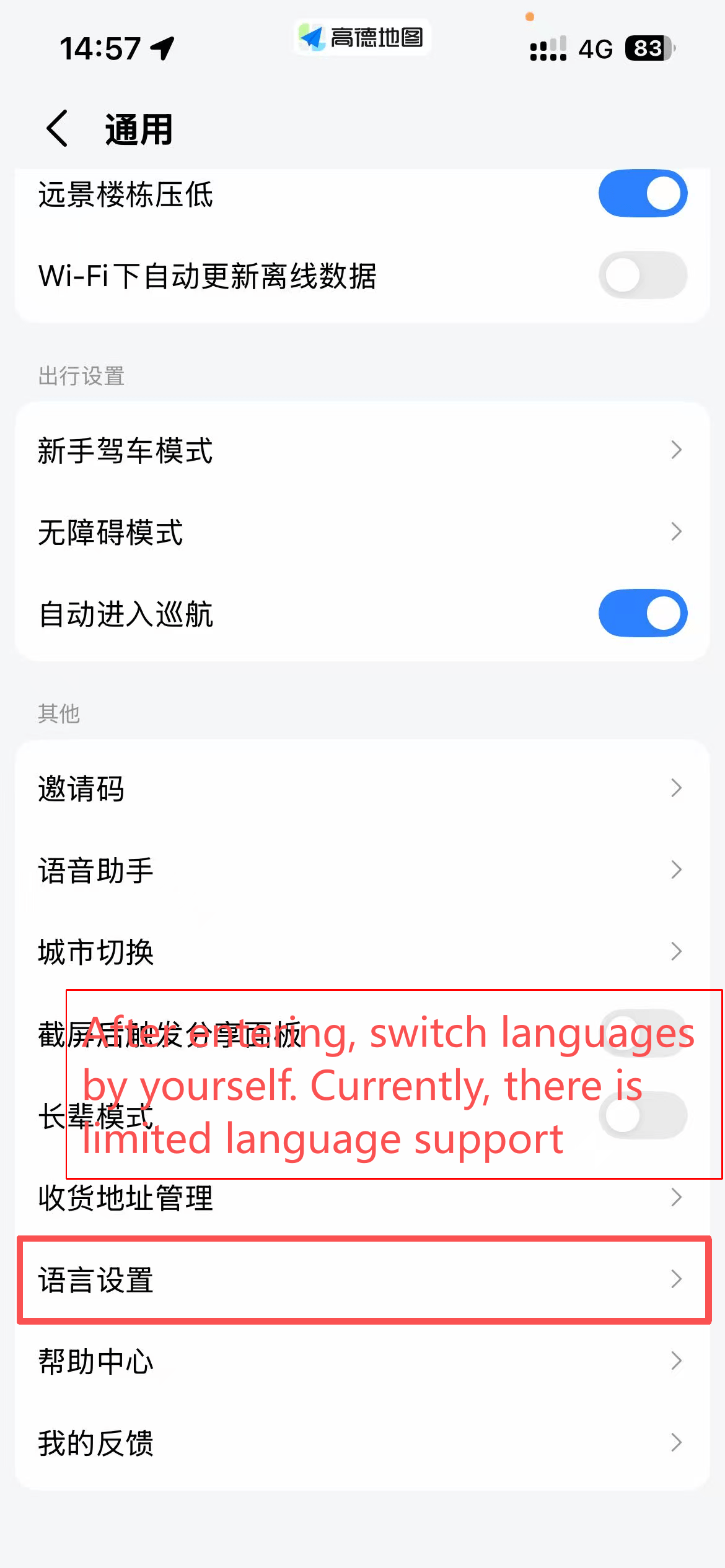
- Amap Global (Amap Go): This is the international version designed for foreigners. It has a cleaner, English-friendly interface, but it only offers basic navigation. It lacks the rich lifestyle features like hailing a ride or finding detailed local restaurant reviews. (💡 Pro Tip: If the international version of Amap you downloaded is in Chinese, refer to the pictures below to switch languages.)
- 高德地图 (国内版): This is what the locals use. It is packed with features (and yes, some annoying pop-up ads), but it allows you to hail taxis, find hidden restaurants, and see real-time subway data.
How to use the Domestic Version as a Non-Chinese Speaker:
- Download: Look for the blue icon with a white paper plane in the Play Store or your app gallery.
- Login Status: You do not need to log in just to search for places or view navigation routes. However, if you want to "Favorite" a location (like saving your hotel) or hail a taxi, you must register. You can usually log in using a Chinese, Hong Kong, Macau, or Taiwan phone number, or by using the email option in the international settings.
- The "Icon Method": You don't need to read Chinese to see the Subway Icon (M), the Restaurant Icon (Spoon/Fork), or the Hotel Icon (Bed).
- Copy-Paste Hack: Copy the Chinese address of your hotel from your booking confirmation and paste it into the search bar. The "Blue Arrow" will guide you exactly where you need to go.
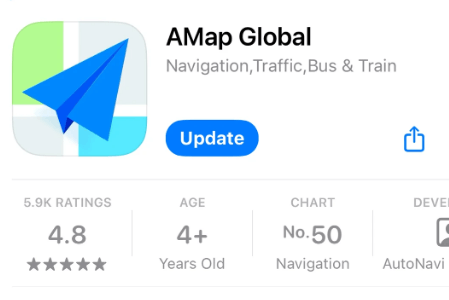
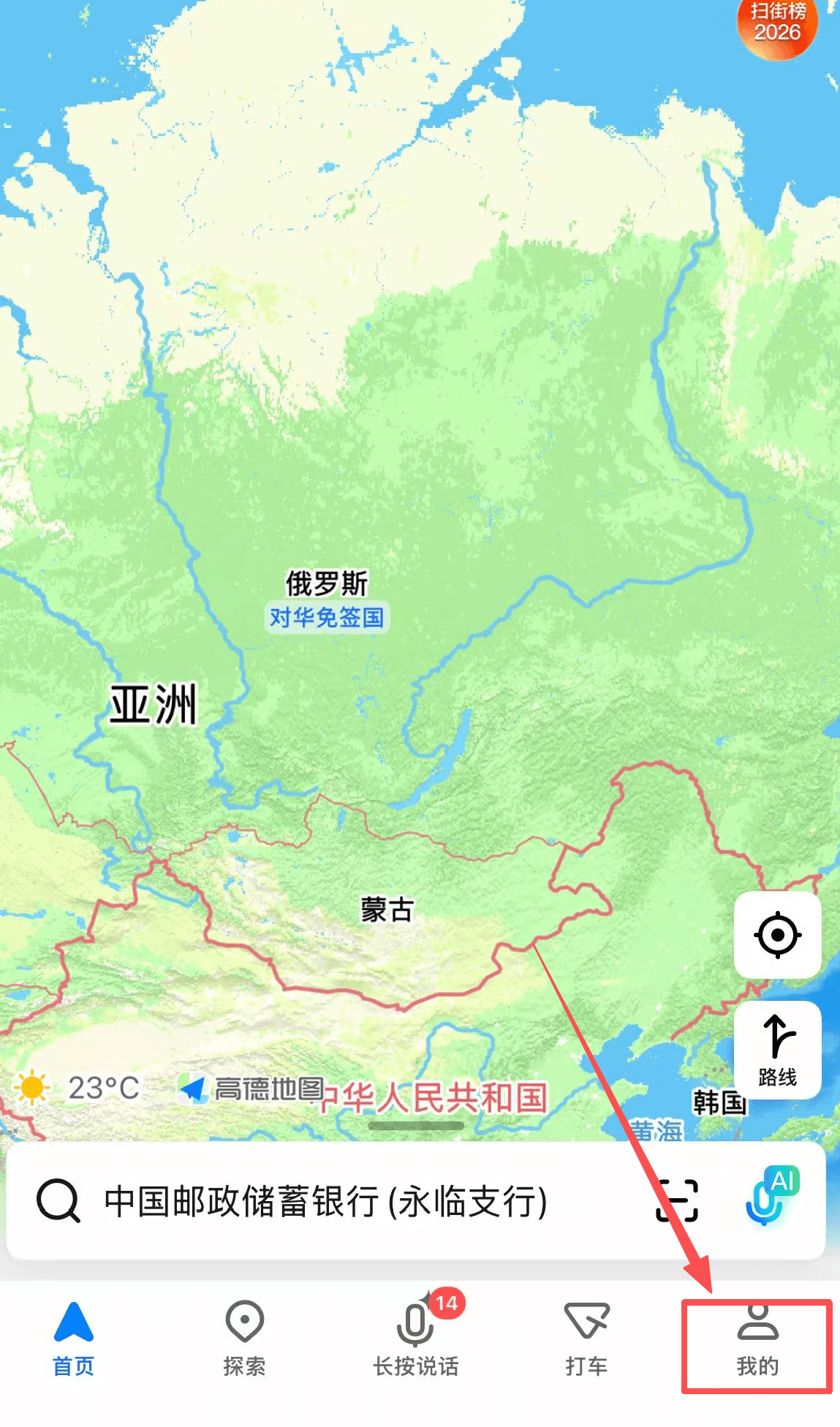
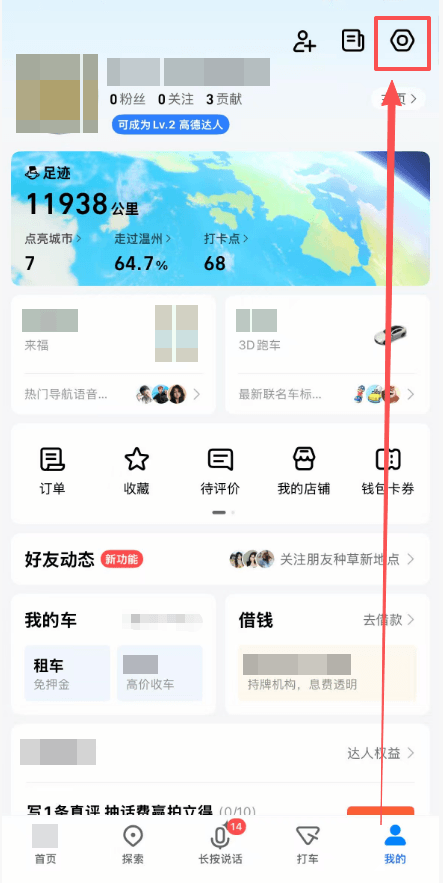
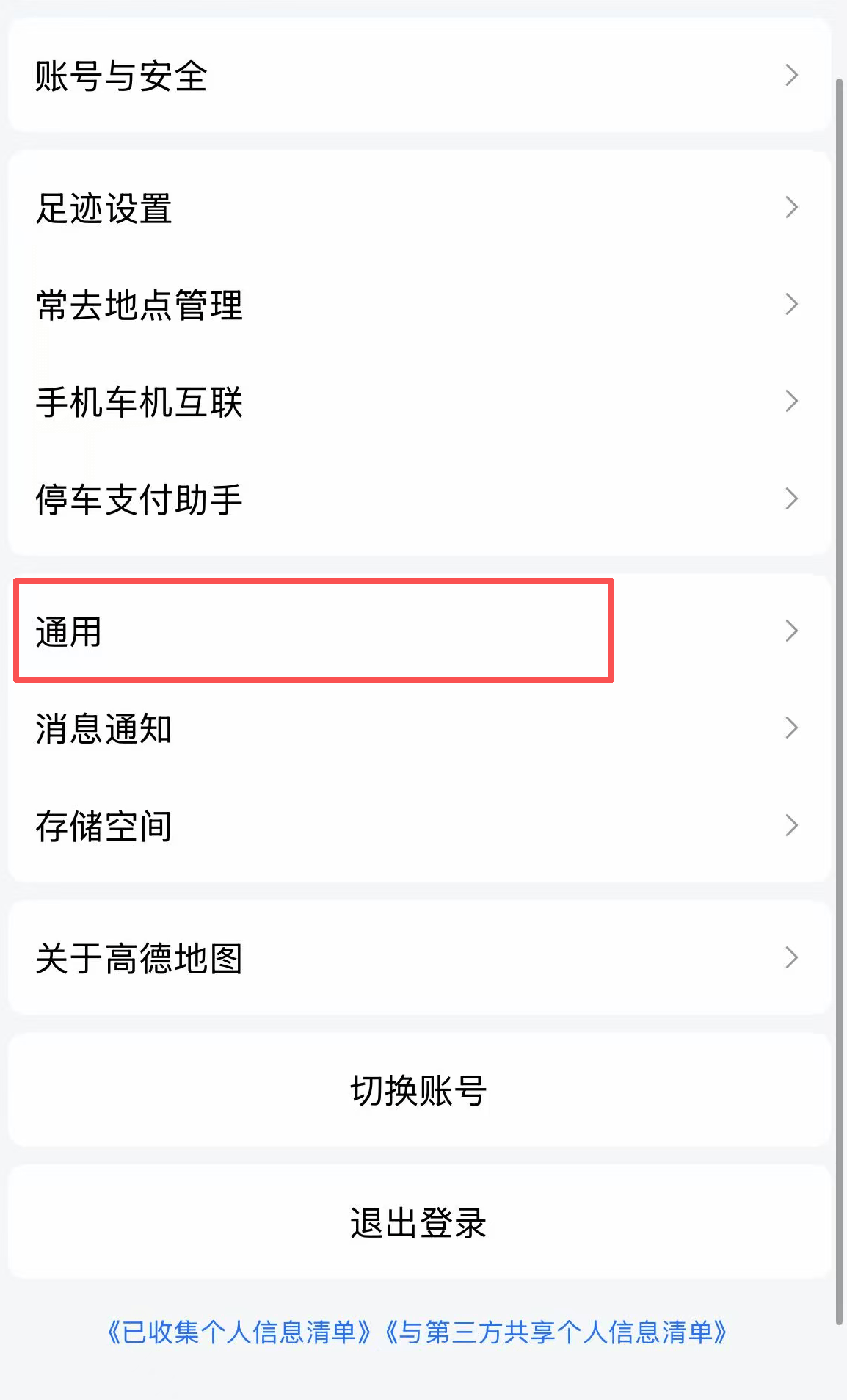
Bonus: You can hail a taxi directly inside Amap! While we highly recommend using Alipay's built-in DiDi for ride-hailing (because the translation and payment integration is flawless), you can also hail a taxi directly inside Amap if needed.
Here is exactly how to do it without getting confused:
- Find a Pickup Spot FIRST: Do not walk while trying to hail a car! Walk to a safe spot where cars can easily pull over (or look for a designated "Ride-hailing Pickup" sign at malls). Stop moving, let your GPS settle for a few seconds, and THEN open the app. If you are walking or manually dragging the pin, the GPS will jump around and the driver won't find you.
- Enter Details: Input your destination (like your hotel name). The app will immediately show you the estimated distance and the price range.
- Call the Car: Click the "Taxi/Ride-hailing (打车)" button. The app will start searching for a driver.
- Wait & Verify: Once a driver accepts, you will see a live map showing how many minutes away they are. Pay close attention to the car's color and the license plate number shown on your screen.
- Communication (Chat & Call): If the driver can't find you, don't panic! Both DiDi and Amap have built-in Chat and Call functions.
- The Call Feature: This is an internet call (VoIP) routed through the app. You do NOT need a Chinese SIM card or phone number to use it, as long as you have data/Wi-Fi.
- The Chat Feature: If you can't speak Chinese, use the Chat! Take a photo of the building or sign right next to you and send it in the chat. Tell them what color clothes you are wearing (like "I am wearing a red jacket"). The app will automatically translate your text to Chinese for the driver.
- Get In: When the car arrives, double-check the license plate! Get in, and the driver will usually ask for the last 4 digits of your phone number to verify you are the correct passenger.
- No Cash Needed: You do not need to hand the driver any cash. When you arrive at your destination, just get out. The app will automatically deduct the exact fare from your linked payment method. (💡 Pro Tip: To use the ride-hailing feature in Amap, you must log in. The absolute easiest way for foreigners to log in is by using your Alipay account or Apple ID, which bypasses the need for a local Chinese phone number verification!)
🚨 Common Pitfall: The Subway Exit Maze
Chinese subway stations are massive underground cities. A single station can easily have 15 to 20 different exits (A, B, C, D, E1, E2...).
The Mistake: Following the map to the "Center" of the station, getting off the train, and then wandering around underground for 20 minutes trying to find daylight.
The Fix: Both Apple Maps and Amap will tell you exactly which Exit Number is closest to your destination. Look for the letter/number (like "Exit C1") in your navigation steps. Follow the yellow overhead signs inside the station—they are always bilingual (English/Chinese)!
FAQ
Q: Can I just show the driver my map?
A: Yes! If you are using a regular taxi, never try to pronounce the street name. Find your destination on your map, zoom in so the Chinese characters are large, and just show your screen to the driver. Many Chinese map apps even have a "Taxi Mode" that displays a massive, easy-to-read card specifically for drivers.
Q: Does Baidu Maps (百度地图) work better than Amap?
A: Both are excellent and used by hundreds of millions of locals. If Amap isn't working well for you, you can absolutely search for and download Baidu Maps. Just like Amap, you can also hail a taxi directly inside Baidu Maps once you log in. However, Amap (Gaode) is generally considered to have slightly better walking and public transit navigation.
Q: Can I just use a VPN and stick to Google Maps?
A: NO! Please do not use Google Maps in China. Even if you have a great VPN, the data on Google Maps is years out of date. It doesn't know about new subway lines, restaurants that have closed, or new roads. More importantly, due to coordinate shifts, the GPS location will be highly inaccurate (often showing you hundreds of meters away from your actual location). You will get lost. Use Apple Maps or Amap.
Q: Why does the Domestic Amap have so many pop-up ads?
A: Welcome to the Chinese app ecosystem! Local apps are often "Super Apps" packed with mini-games, hotel bookings, and ads. Just look for the small "X" or "跳过 (Skip)" button in the top right corner of the ad to close it. You only need the core map functions.
Q: Do I need a VPN to use Amap or Apple Maps?
A: No! In fact, you should turn your VPN OFF when using local maps or ride-hailing apps, as a VPN might slow down your GPS connection or cause the app to think you are in another country.
Q: Should I bind my phone number to Amap before arriving?
A: If Amap requires you to bind a phone number, it's best to bind your own home country phone number before coming to China. If binding fails, don't worry! You can just use DiDi for ride-hailing. Binding a phone number only affects the ride-hailing feature; searching for routes and navigation are not affected at all.
© Copyright Notice
This article is originally published by China Fixer. All rights reserved. Unauthorized reproduction, scraping, or commercial use of this content is strictly prohibited.
If you wish to share this guide, please use the original link: https://cnfixer.xyz/de/guides/navigating-china-maps
Haben Sie Fragen?
Wenn Sie etwas nicht verstehen, fragen Sie bitte unten im Kommentarbereich, und ich werde sofort antworten!
Authentic guide by a local who has lived & traveled extensively across China.
Last updated: 2026